Connect WalkMyPlan to Claude
Two clicks · WalkMyPlan is in Claude's official connector directory
1
Open the WalkMyPlan listing and press Connect
Go straight to WalkMyPlan in the Claude directory (or in Claude: Search connectors → type WalkMyPlan).
2
Sign in
Claude asks to connect — approve, then sign in to WalkMyPlan with Google or Facebook, or create a free account with your email right on that page. It continues by itself when you're done.
3
Design something — and say WalkMyPlan in the prompt
"Use WalkMyPlan to build a 10 by 10 meter house: master bedroom with private bathroom, two kids' rooms, a garden. Decorate it, give me the link." "In WalkMyPlan, give me a link to upload my floor plan - or to draw it myself."Naming the tool matters: without it, Claude may just describe a house instead of building the real, walkable model. Claude replies with a link to your plan — walk it in 2D and 3D, then keep talking: "make room 3 wider", "move the door on the north wall".
Claude can't see the directory? Some workspaces disable it. Add WalkMyPlan manually instead:
claude.ai/settings/connectors
→ Add → Add custom connector, name it 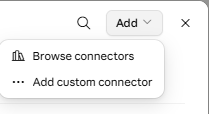
WalkMyPlan and paste
https://mcp.walkmyplan.com/mcp
— leave Advanced settings empty, keep Individual sign-in on, press Add, then approve and sign in as above.
Prefer ChatGPT? WalkMyPlan is in the plugin directory there —
open the plugin page
and press Install plugin. Any other MCP client works with the same URL:
https://mcp.walkmyplan.com/mcp.